

As someone who has taken the NYC subway for decades, I love all the subway apps that make taking public transportation in the city easier, even though I know the system already!
For those new to taking the subway and buses, these apps can help you make sense of it all.
These apps will also make your travel more efficient, saving you time which you can then use to enjoy the city's sights and join one of our free NYC tours!
In this post, we go over several of the best apps for both iOS and Android, most of which are free and include trip planners.
With trip planners, you don't need anything other than an itinerary of where you want to go!
Before we get to the app list, you may find these other posts below helpful.
- Navigating the New York Subway
- Which MetroCard is Right for You?
- Which Hop-on, Hop-Off Bus is Best?
- Getting Around NYC
- Where to Find Free Wi-Fi in New York
- Definitive Guide to Things to Do in NYC
After trying many apps, we've narrowed the list down to nine. These are apps that my fellow tour guides and I use.
At the bottom of the post, we've included the opinions from members of our NYC Travel Tips Facebook group.
Our Facebook group of more than 240,000 members consists of locals, frequent visitors to NYC, and newcomers to the city.
There's no need to join the group to read the comments and recommendations. So take a look at our group for more ideas!
Before we continue, would you like the option of a 1-hour subway tutorial tour?
Well, we have the tour for you.
Let Free Tours by Foot NYC, teach you the ins and outs of the system in just 60 minutes.

GOOGLE MAPS
Free - iPhone, iPad & Android
Google Maps is one of the top navigation apps not just for NYC but around the world. It's my go-to app in NYC as it offers the easiest and most comprehensive trip planner feature.
Features
- Trip Planner provides Point A to Point B directions by multiple modes of transport including driving, walking, subway, bus, bike and other local transit systems such as the Long Island Railroad.
- Real-time updates show estimated time of arrival, delays, and much more.
- Allows for multi-stop trips with the Add a Stop option.
- Customize the app to offer directions based on your preferences.
- Offers a voice feature that speaks step-by-step instructions to get where you are going.
- Has offline capability for some functions.
Using the Trip Planner
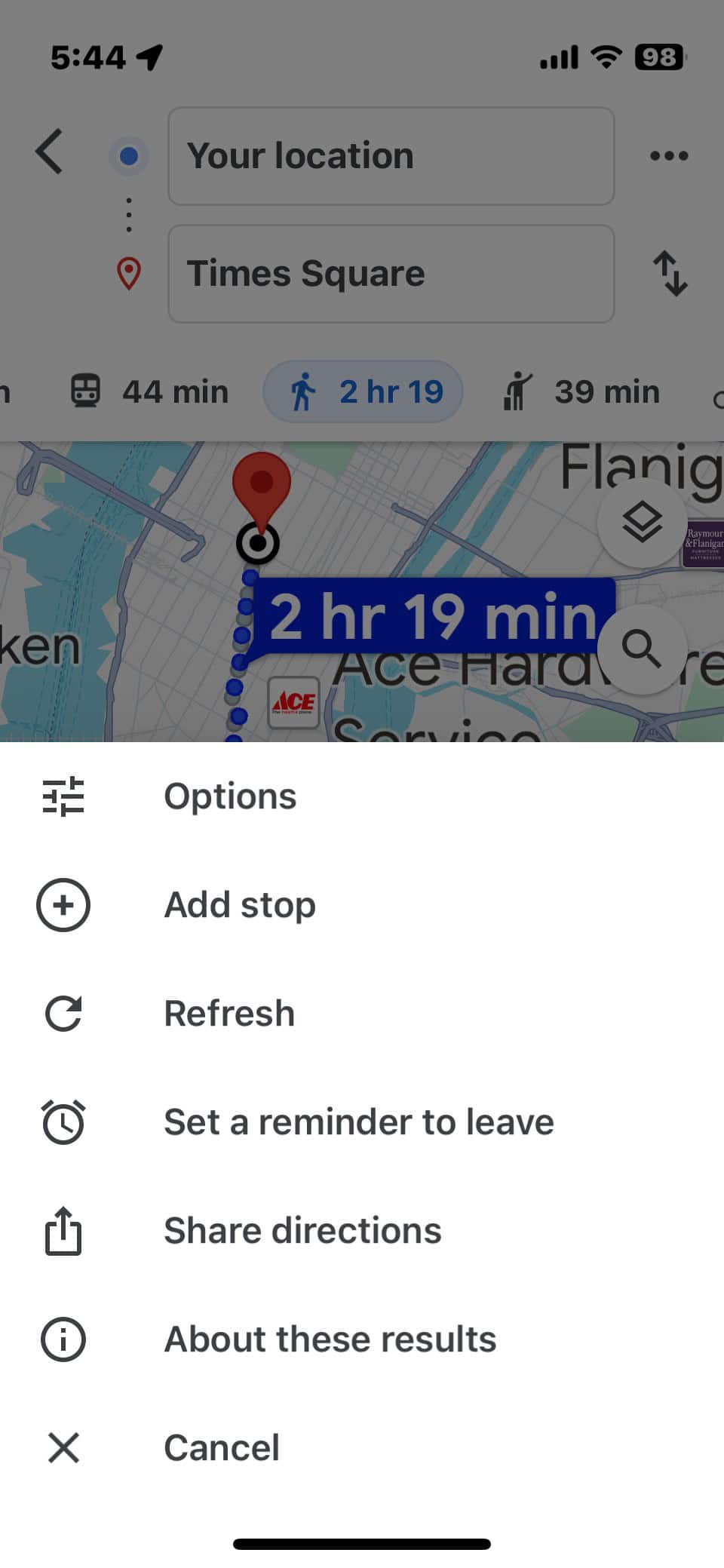
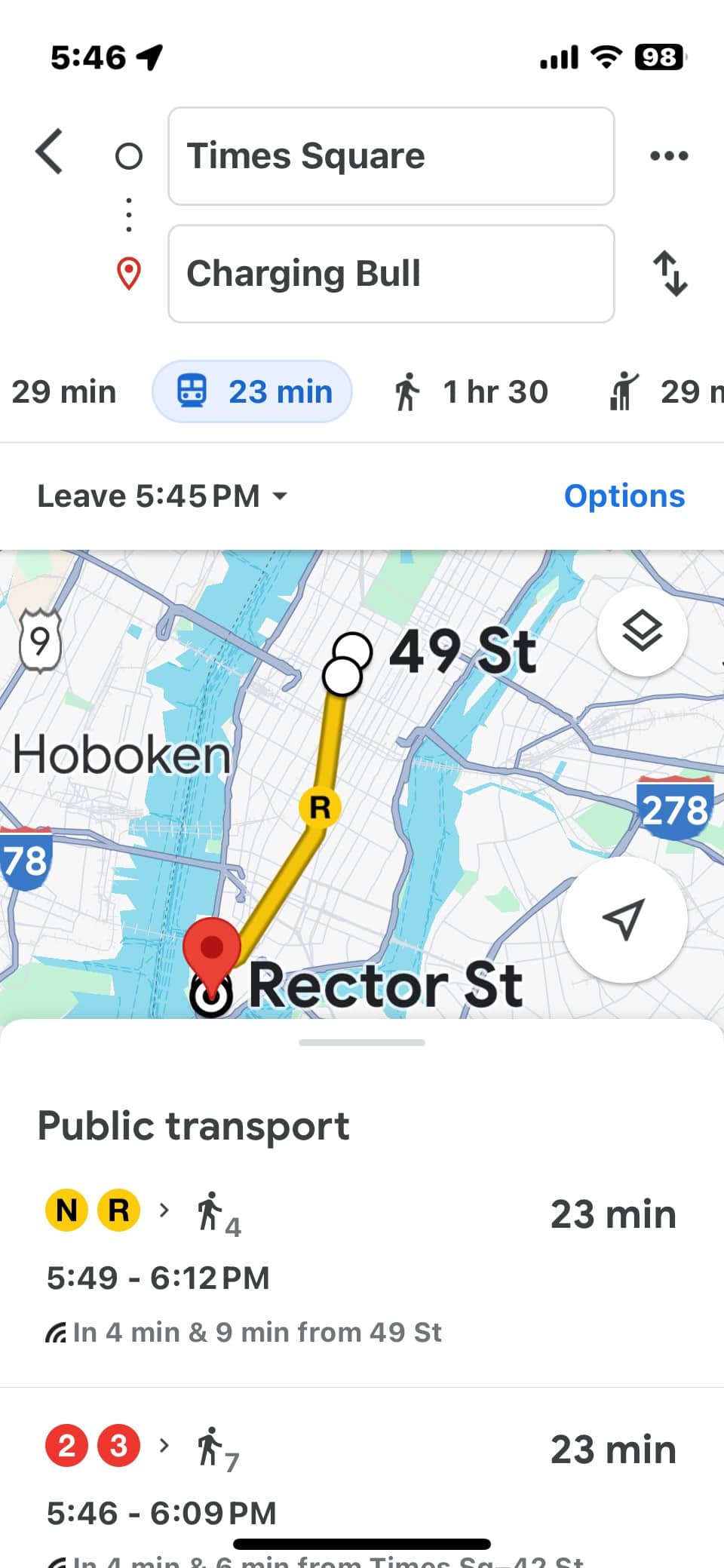
Here are a few screenshots of a trip from Times Square to the iconic Charging Bull of Wall Street and instructions to use the Trip Planner.

Screenshot 1
Enter your starting location in the top box. By default, the app uses your current location, designated by a blue dot.
Click on the blue button "Directions" and enter your destination.
Choose the mode of transportation you want by tapping on the icon. For this example, we chose the subway train icon for public transportation routes.
Screenshot 2
If you want to set any preferences, such as fewer transfers versus less walking, choose the "Options" function by pressing the three dots to the right of the box at the top that has your starting point.
Screenshot 3
The app offers a few routes with travel time, distance to/from subway stations, and other important information like delays, frequency, and even how busy the subway is.
Choose the route you want and detailed instructions are provided.
One great feature
This app is ideal for tourists because you don't need to know the addresses of major attractions.
Want to go to the Empire State Building? Just start typing in E-M-P and the app uses auto-prediction to provide you with a choice of possible destinations, with Empire State Building coming up first.
TIP: If you are going to the Empire State Building, see our post with all the information you need, including how to save money on tickets.
TRANSIT
Free - iPhone, iPad & Android.
Transit is very similar to Google Maps with an interface that is easier to read. If you are looking for a simple but accurate trip planner, Transit is for you.
One thing we love about Transit is that it includes nearly every mode of transportation in NYC and the surrounding areas.
Not only do you get the New York City public transportation information, but also commuter and light rail systems for New Jersey and Long Island.
This app also includes all the ferry services, the Roosevelt Island tram, and NYC's bike-share program, Citibike. A bike path map is also available.
By the way, NYC is quite bike-friendly so consider renting a bike to see the city in a new light.
Features
- Shows you subway lines, bus lines, rideshares like Uber and Lyft, ferries, and other modes of transport nearest your current location.
- Displays real-time status.
- Trip planner is simple to use. You can customize what modes of transport are displayed and included in routing. For example, if you know you will never take the bus, unselect BUS and this app won't show you bus options.
- Available in English, French, Spanish, Italian, German, Portuguese and Dutch.
- Watch this video for a quick introduction to the app.
One great feature
You can set it to alert you when you are nearing your destination, which is perfect for those unfamiliar with the city or are prone to falling asleep on subways after a long day of walking around the city!
Using the Trip Planner
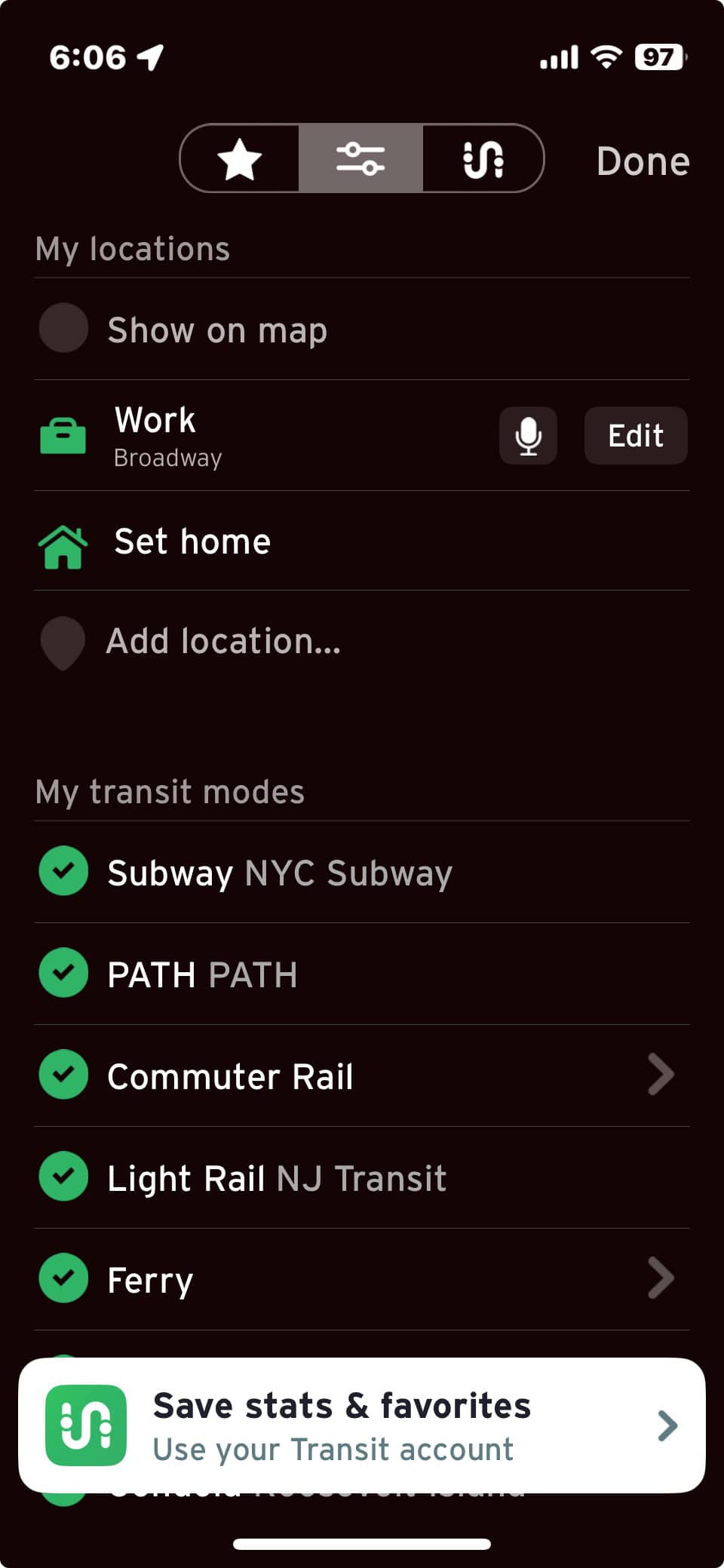
Here are a few screenshots of a trip from Times Square to the iconic Charging Bull of Wall Street and instructions to use the Trip Planner.


Screenshot 1
On the main screen, tap the search bar. In the screenshots above the starting point is Times Square.
Then enter your destination. You can use an address, type in an attraction, select a point on the map, or even pull up an address from your phone's contacts.
Screenshot 2
If you want to set any preferences, such as modes of transportation you want to use, press the "Options" icon (shown in the purple circle on the image above).
Screenshot 3
Close the Options screen and see the results. Choose the travel directions that suit you best.
TIP: In some cities, it is possible to purchase your tickets through this app. This feature is not available in NYC. Read our post Which MetroCard is Right for You? to learn how to buy your tickets.
NEW YORK SUBWAY MTA MAP
Free - Android, iPhone, iPad, and Apple Watch; VIP versions available for a fee.
Just to be clear - this is not the official New York City Metropolitan Transit Authority (MTA) app, though it does include the official maps.
When the New York Subway MTA Map by Mapway first became available, it was a nice addition to the world of subway apps. Unfortunately, it now has ads.
Still, it's an app to consider as it is a fairly straightforward app with many of the same features as other apps.
Its user interface is not complicated but not as user-friendly as Google Maps or Citymapper.
Features
- The easy-to-use route planner will get you from A to B on the subway.
- Uses the official MTA map of the New York Subway.
- Works offline.
- Countdown Clocks for each subway station to check when the next train is due.
- Service Status information about delays or changes with alerts sent straight to your phone.
- Search for a particular subway station or find the nearest station to your current location.
- Uber integration allows you to book a taxi within seconds and continue your journey after using the New York Subway.
Great feature
It offers information about out-of-service elevators and escalators. This is very important if you are traveling with a lot of luggage or a baby stroller. If you need an accessible station this app will find you one.
Using the Trip Planner
The trip planner in this app is very basic and requires that you input your departure point.
It does not default to your current location, so I prefer the other apps.
It does, however, have a neat feature. It has a dropdown menu of Points of Interest (major tourist attractions and locations) such as the Brooklyn Bridge and Central Park, so you don't need to know the addresses.

TIP: Speaking of luggage, if you are looking for storage locations, read Where to Store Luggage in New York City?
CITYMAPPER
Free - iPhone, iPad, Apple Watch, and Android.
The app is constantly expanding to cities throughout the world, so keep an eye on this app, it is literally going places.
It also has some great features even fancier apps do not. You can use their homepage from your computer as it has the same functions as the app does.
Features
- Suggests Point A to Point B trip routes with travel time and ETA including all modes of transport (bus, subway, train, ferry, taxi (Uber, Lyft, yellow cab), car share, bike share, and walking.
- Real-time departures. Subway line status and real-time disruption and delay alerts.
- Uber integration. Bike routing and live bike share info. Constant updates.
- Shows which train car is the best spot to be riding in to be closest to your train exit or transfer walkway (This is such a New Yorker thing! Always rushing!)
- Transit maps that can be accessed offline (Official NYC subway map, Manhattan bus map, Brooklyn bus map, Queens bus map).
- It has an alert function to let you know when you have reached your station.
Great feature
It lets you choose your language! English, French, German, Italian, Spanish, and more!
NYC TRANSIT: MTA SUBWAY AND BUS
Free - iPhone and Apple Watch, premium paid version available
This app has all the bells and whistles of other apps with a clean and simple look.
One downside is that it is available only for iPhone and Apple Watch, with no Android version expected yet.
Features
- Live bus and train times, see bus and train locations in real-time.
- Schedule alarms and get reminders before your bus or train arrives.
- Service alerts for delays and route changes.
- Saves favorite stops and stations.
- Live directions with route options (fastest, trains only, buses only, walking, etc.).
- Both live and offline route maps.
- Get off alerts and live countdowns for the arrival of buses and trains.
Great feature
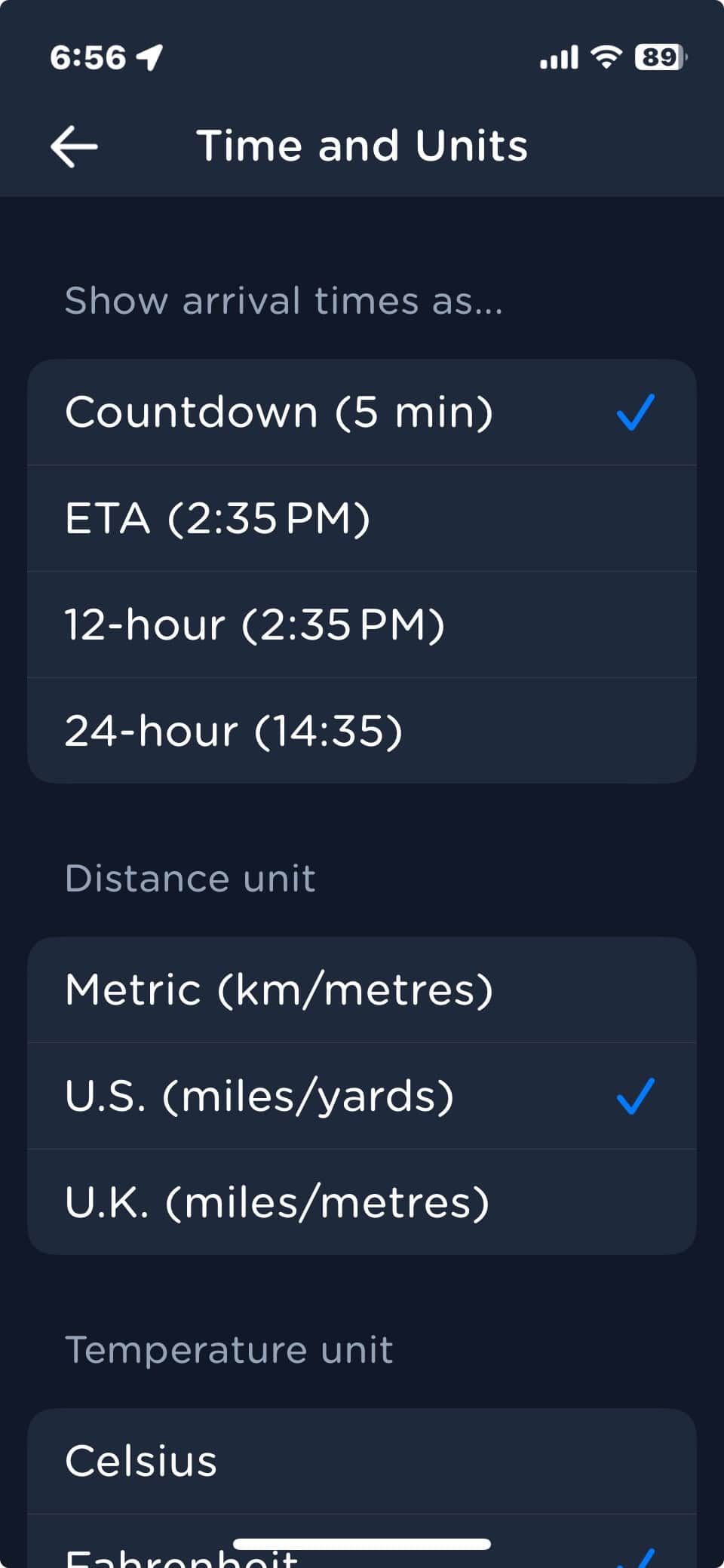
Choose your own format for arrival time (Countdown, ETA, 12-hour clock, 24-hour clock). And, for overseas travelers, you can set distance as U.S. miles/yards, U.K. miles/meters, and Metric km/meters. (screenshot 3).

Using the Trip Planner
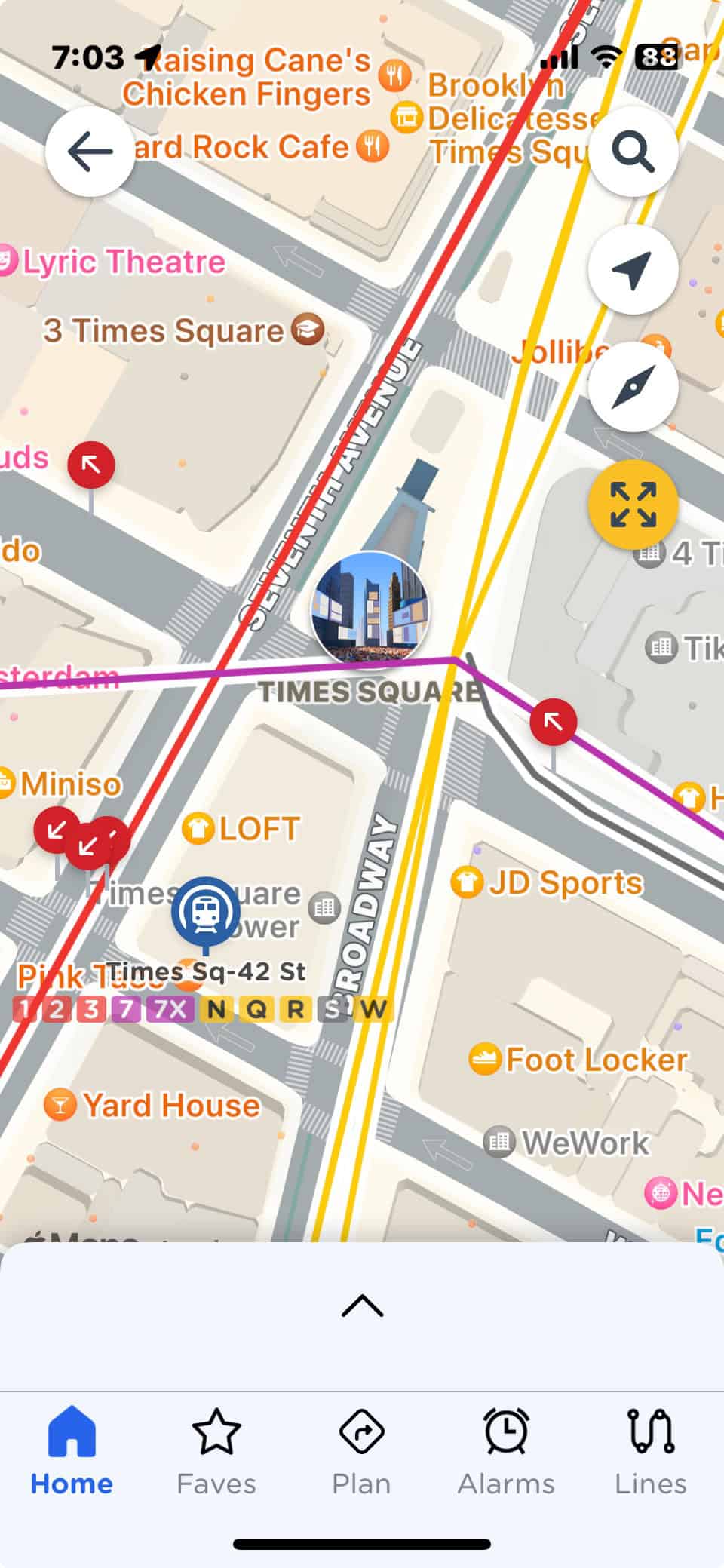
This operates like the other trip planners in this post. It has auto-prediction when you start to type in the name of an attraction, shop, etc.
The coolest feature is for those of us who take the buses. The maps clearly indicate with red arrows which direction the bus route on a particular street is heading. (screenshot 2).
Knowing the bus stop isn't always enough. You've got to know if you are waiting on the right side of the street!
MY TRANSIT: MTA SUBWAY & BUS
Free - Android | Coming soon to iPhone
This highly popular app offers all you would want from a transit app.
Though it’s not available in iOS yet, it should be soon.
Features
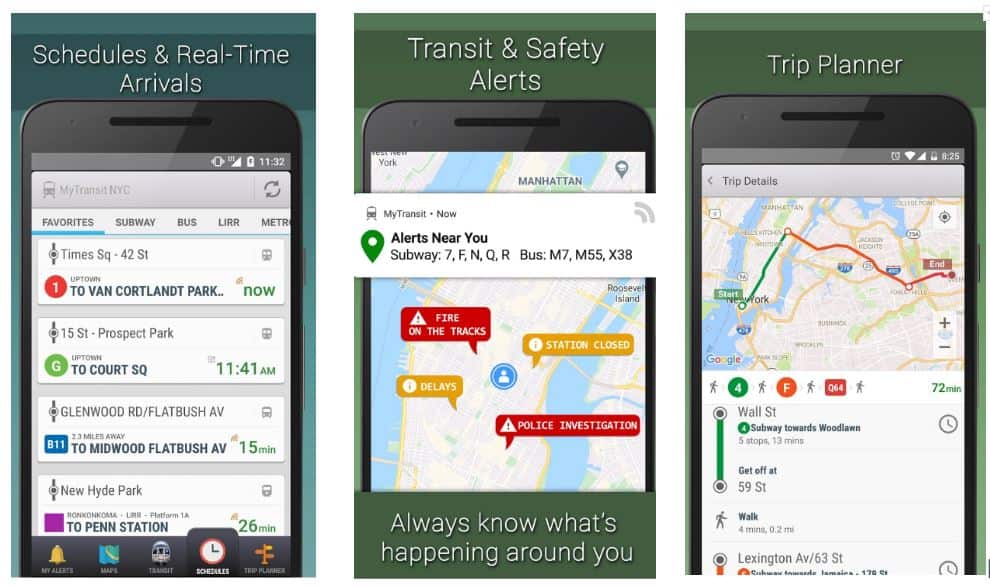
- Real-time arrivals, schedules and live transit status.
- Detailed alerts and notifications about transit changes and disruptions.
- Trip planner that includes Subway, Bus, Rail, Ferry, and Walking.
- Collection of officially licensed, high-resolution transit maps for all modes of transport.
Great feature
App has a crisp, pleasing user interface for easy viewing.
Using the Trip Planner
Essentially the same process as the other apps in this post.
KICKMAP
$2.99 iPhone, iPad, iPod touch.
Many tourists and locals alike have learned the hard way that not all subway stations have a crossover walkway to go in the opposite direction.
If you want to go uptown and enter the station thinking that once you are in the station and paid your fare you can find the uptown platform, be warned -- there are some stations in the city without a crossover option.
This means that once you've swiped your MetroCard and see you are on the downtown platform, the only way to get to the uptown platform that you need is to exit the station, cross the street and pay again to enter!
Even if you have an unlimited card, once you have swiped it, you cannot swipe again for 18 minutes.
KickMap will spare you the frustration and save you money by telling you in advance which stations have crossovers and which do not.
Features
- NYC subway map works underground without an internet connection (connection only needed to look up street addresses and get live transit alerts)
- Directions without an internet connection are displayed right on the map
- Pop-up Google street map - Press any station for 3 seconds to see the local area
- Built-in Compass - Helps with an orientation at street-level
- GPS Locator - Shows closest subway stations
- Transit Alerts - Push notifications of delays for only the lines you choose
- Shows over 350 NYC Neighborhoods and Parks
Great feature
24-hour Day/Night maps - Automatically switch maps at 11 pm and 6 am
EXIT STRATEGY
$3.99 iPhone, iPad, iPod Touch, Android, and BlackBerry.
For people visiting New York, you may be surprised to find out that our subway stations are quite long and offer multiple exits.
Leaving the station at the wrong exit can leave you blocks from your intended destination.
Exit Strategy tells you exactly where on the platform you should board the train so that when you arrive at your destination stop – voila – the desired exit is right there!
This app is one of my favorites, especially on rainy days!
One feature that I adore that you will too, is the offline Manhattan street map.
You'd think after a lifetime here in the Big Apple one would know every street in this town! Easier said than done!
Features
- Shows exit locations for all 469 subway stops in NYC.
- Neighborhood maps show subway exits/entrances at street level.
- Works offline.
- Zoomable, scrollable and interactive MTA subway map and Manhattan street map.
- MTA bus maps for all five boroughs.
Great feature
Time-saver and saves you some unnecessary walking which is good for the weary traveler!
MOOVIT
$3.99 a month ad-free for iPhone, iPad, Apple Watch and Android or free with in-app purchases.
Moovit is a “one-stop-shop” app that provides step-by-step directions of the optimal route from Point A to Point B within New York City, New Jersey and Connecticut.
It includes these modes of transportation: subway, bus, train, ferry, bike, rideshares, and even electric scooters!
Moovit provides real-time arrival information and will notify you if there are delays, service updates and more.
The app even provides real-time crowdedness - so you can avoid being squashed in a subway car!
The downside is that the free version has ads for in-app purchases which can disrupt your transit planning.
Features
- Real-time arrivals and real-time alerts. Receive service alerts such as emergency or unexpected disruptions, and delays.
- Step-by-step transit directions including the walking distance from where you are to the closest station.
- Receive get-off alerts as you near your stop.
- Save favorite lines, stations, and places.
- Use maps view to see all stations and lines on the subway or bus map.
- Maps are available in PDF for when you’re offline, or underground on the subway.
Great Feature
Includes every form of transportation except your car!
TIPS FROM LOCALS AND TRAVELERS
As I noted at the beginning of this post, my fellow tour guides and I use some of the apps in this post and we each have our favorites.
However, we like to share suggestions from members of our New York Travel Tips Facebook group so you can hear what other locals and visitors to NYC have to say.
Overall, visitors to NYC were pretty happy with Google Maps.
That may be because many people are already familiar with Google Maps from where they live and they can jump right in and navigate the app right away.
These travelers tried other apps and preferred Google Maps to move around the city and subway system.

This return visitor to NYC always uses Google Maps.

Since many of you may be familiar with Google Maps, let’s see what our Facebook group members say about apps you may not have heard of.
After Google Maps, Citymapper was most frequently mentioned.
The Citymapper feature that was most appreciated was that the app tells you which exit to get you closer to your destination and even where on the train to stand to be closest to that exit.

Locals also give Citymapper the thumbs up!

Here’s a group member who combined the best of both worlds: Citymapper for riding the subway and Google Maps for exploring on foot.

A few of the other apps in this post were recommended, but in the end, it comes down to what people are most comfortable with, interface-wise. If it is too complicated for you to look at, try another!
Since it is free to download apps, why not try a few and see which you prefer.
If you have more questions about NYC subway apps (or anything else about NYC) that we haven't covered here, check out our New York Travel Tips Facebook group!
And please do let our Facebook group members know which app worked for you!
